
Diary Notebook Free1.166 - Get APK
You'll be able to download in few seconds.
Publisher Description
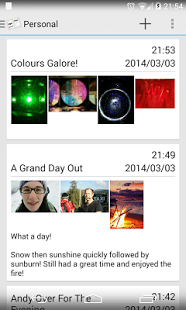
Wanting to write a daily diary on the go? Need something clean, simple, modern and attractive? Love card based UIs? Diary Notebook is the app to use!
Multi Diary Notebook is a simple and attractive diary tool that makes use of the modern, clean, card based interface. Use it to create a different log for all of your projects. Journal entries are summarized in a simple, modern and clean card interface with the full details just a tap away.
Whether you want to take notes in a meeting or write down all your thoughts and ideas on a simple notepad, diary notebook is the perfect diary for the job. Attach pictures to your journal either straight from the camera or your device's gallery to help remember those special moments.
Diary Notebook makes a great:
• Project Diary • Lab Diary • Personal Diary • Travel Journal • Notepad • Dream Journal
Features:
• Have multiple diaries/notebooks on the go at once.
• Keeps all your diaries/notepads separate.
• Entries summarised on modern styled scrolling cards.
• Swipe between entries for easy navigation.
• Displays entries in chronological order with the option to edit and change dates.
• Attach photo memories to your diary.
Upcoming features:
• Password protection
• Diary export functionality (PDF, Image etc)
About Diary Notebook Free
The company that develops Diary Notebook Free is Dented Enterprises. The latest version released by its developer is 1.166.
To install Diary Notebook Free on your Android device, just click the green Continue To App button above to start the installation process. The app is listed on our website since 2014-03-28 and was downloaded 0 times. We have already checked if the download link is safe, however for your own protection we recommend that you scan the downloaded app with your antivirus. Your antivirus may detect the Diary Notebook Free as malware as malware if the download link to com.dented.simplemultidiaryfree is broken.
How to install Diary Notebook Free on your Android device:
- Click on the Continue To App button on our website. This will redirect you to Google Play.
- Once the Diary Notebook Free is shown in the Google Play listing of your Android device, you can start its download and installation. Tap on the Install button located below the search bar and to the right of the app icon.
- A pop-up window with the permissions required by Diary Notebook Free will be shown. Click on Accept to continue the process.
- Diary Notebook Free will be downloaded onto your device, displaying a progress. Once the download completes, the installation will start and you'll get a notification after the installation is finished.
Program Details
System requirements
Download information
Pricing
Version History
version 1.166
posted on 2014-03-28
1.166 Improved memory usage of images to avoid bugs with large screened devices with hi res cameras.,1.164: Fixed crash when rotating in gallery before saving the entry,Behaves better if an image is not found.,1.162: Fixed bug stopping image attachments from gallery,1.16: Fixed crash when loading large images,1.11: Fixed crash when adding images to an unsaved entry.
Disclaimer
External Download
We do not host Diary Notebook Free on our servers. We did not scan it for viruses, adware, spyware or other type of malware. This app is hosted by Galad and passed their terms and conditions to be listed there. We recommend caution when installing it.
The APK Download link for Diary Notebook Free is provided to you by apps112.com without any warranties, representations or guarantees of any kind, so access it at your own risk.
If you have questions regarding this particular app contact the publisher directly. For questions about the functionalities of apps112.com contact us.
